

What if the QR code isn’t the hard part of parking payment? Setting up a QR code payment for parking works best when drivers can trust the sign, understand where a scan will take them, and know how to complete a reservation. If a step is unclear, they may not know whether they’ve reached the right space or finished booking.
You want a simple scan-to-pay flow, not extra questions at the curb. This guide walks you through the driver journey, from the sign to the online parking experience. You’ll learn how to choose the right destination, write useful instructions, and test that the sign and parking details match. CurbFlip® Scan To Pay signs connect a physical parking space with CurbFlip’s online platform, where drivers can find and reserve parking.
Key Takeaways
- Make setting up a QR code payment for parking easier by mapping the driver journey from sign to online parking reservation.
- Choose the right parking destination, write clear instructions, place the sign where drivers can see it, and test the full flow.
- Identify the location and parking area, and explain what drivers should expect before they continue.
- Connect a physical sign to an online parking experience with CurbFlip® Scan To Pay signs, which help drivers find and reserve parking.
Setting up a QR code payment for parking: map the full driver journey
Setting up a QR code payment for parking means creating a clear path from a sign to an online parking reservation. The QR code connects the sign to the online experience, but it is only one part of the process. Drivers also need to recognize the correct space, understand the instructions, and know what to do after scanning.
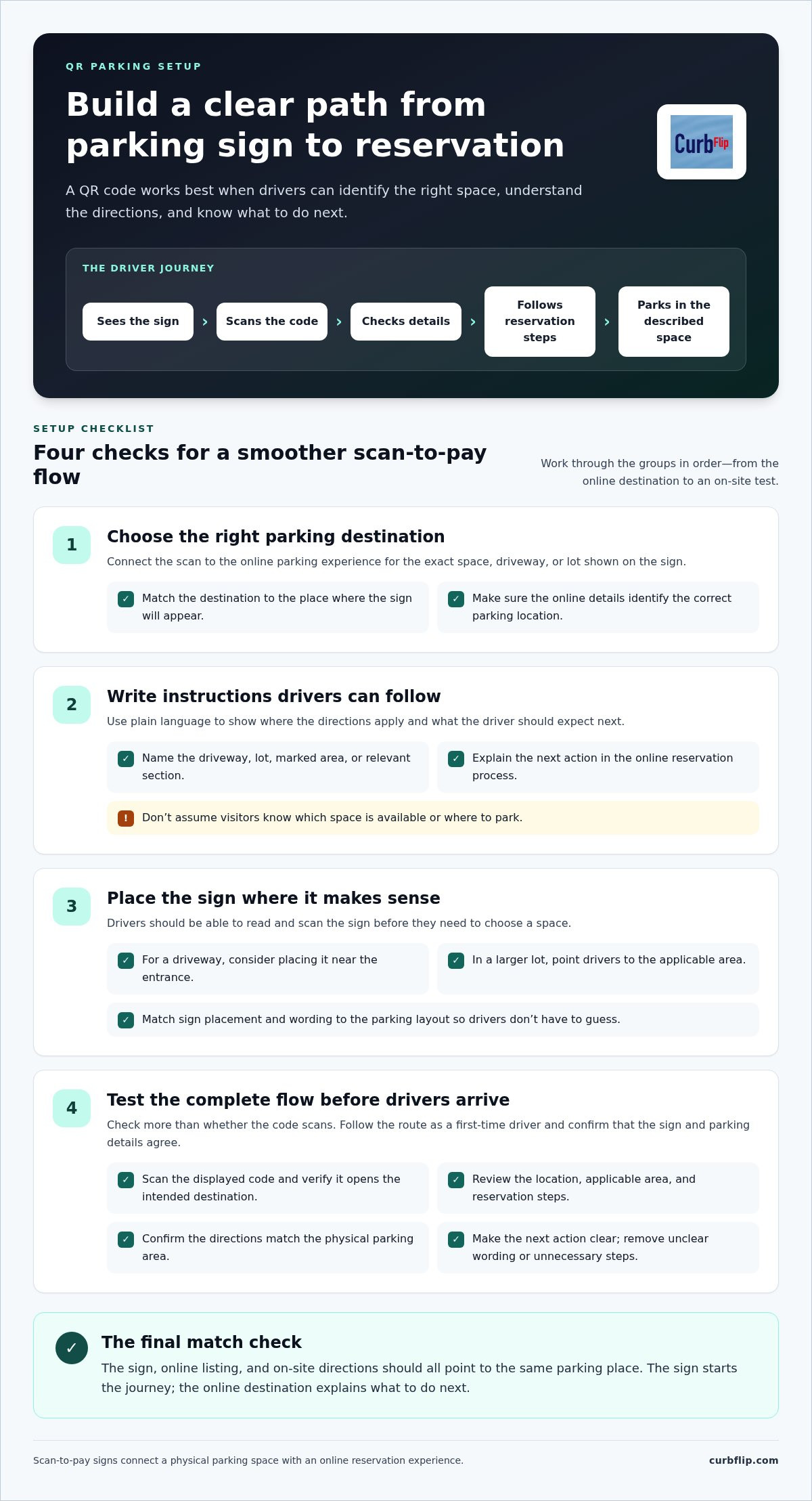
Plan the experience in order: a driver sees the sign, scans it, checks the parking details, follows the reservation steps, and then parks in the space described. Each step should make the next one clear. If the sign points to the wrong area or the online details are vague, drivers may hesitate or choose the wrong space.
For a quick reminder about checking a QR code’s destination, watch this video:
What should a driver see after scanning a parking QR code?
The destination should identify the parking location and explain the next action in plain language. Name the driveway, lot, or marked area the instructions apply to, then tell drivers how to continue with the online reservation. Put the key directions where they can read them before proceeding.
The details depend on the parking setup. A single driveway may need a short description of the space, while a larger lot may need directions to a specific section or entrance. Before listing a space, follow the driver journey yourself. Check that the sign, online listing, and on-site directions all point to the same place. If the booking flow provides a confirmation or follow-up instruction, make sure drivers know what to look for and what to do next.
How to set up QR code parking payments in clear, practical steps
Setting up a QR code payment for parking is easier when you prepare the driver’s route before putting up a sign. Work through these steps in order:
- 1. Choose the parking destination. Connect the scan to the online parking experience for the correct space, driveway, or lot. Check the destination against the exact place where the sign will appear.
- 2. Prepare clear instructions. Identify the location and the parking area the instructions apply to. Explain what drivers should do next and what to expect during the reservation process. Don’t assume visitors know which space is available or where to park.
- 3. Place the sign. Position it where drivers can see and scan it before they need to choose a space. In a lot with several areas, make the directions specific enough to connect the sign with the correct parking location.
- 4. Test the flow. Scan the displayed code and confirm that it opens the intended destination. Read the instructions as a first-time driver, then check that the directions match the physical parking area.
Test the sign and payment journey before drivers arrive
Check the full route, not just whether the code scans. The destination should show the right parking location and make the applicable area, reservation steps, and next action easy to understand. Remove unclear wording and unnecessary steps that could make a first-time driver pause.
Scan, verify the destination, review the instructions, and confirm the next step. This launch check can catch mismatches between the sign and the parking setup before drivers use it. For examples of scannable signage, explore the CurbFlip scannable parking signs available for different parking needs. The National Institute of Standards and Technology also offers guidance on secure digital authentication, useful background when considering how online experiences build user confidence.
Use scannable signs for easier QR parking payments
A scannable parking sign gives drivers a clear starting point at the space. It links the physical location to an online reservation experience, helping drivers move from spotting a space to finding its parking information. The sign and online destination work as a pair: the sign directs drivers, and the destination explains what to do next.
This approach can suit different parking needs, including private driveways, airport parking, beach parking, church parking, and event parking. CurbFlip’s parking marketplace serves drivers and hosts in New York, Chicago, Los Angeles, Seattle, Atlanta, San Francisco, London, Denver, Miami, Dallas, Houston, Austin, Nashville, Memphis, New Orleans, Southern California, Toronto, Montreal, and Vancouver. For background on how QR codes fit into mobile parking payment technologies, consider how a sign-to-online experience can support a straightforward driver journey. CurbFlip Scan To Pay signs connect drivers at a parking location with the platform, where they can find and reserve parking.
Choose sign placement and wording that drivers can understand
Place the sign where drivers can read and scan it before choosing where to park. At a driveway, that may be near the entrance. In a larger lot, direct the driver to the applicable area. Match the placement and wording to the layout so drivers don’t have to guess which space the sign refers to.
Keep the message direct. Name the location or parking area, explain the next step, and make sure the wording matches the online listing and parking directions. Consistent details help drivers recognize that the sign and destination belong to the same parking experience.
Use CurbFlip Scan To Pay sign options to guide drivers from your property to an online reservation experience.
Make your parking sign the start of a clear driver journey
A smooth scan-to-pay experience depends on more than a QR code. Give drivers a visible sign, a clear parking destination, and simple instructions that explain what to do next. Before you open the space to drivers, scan the code and make sure the sign, online information, and directions match.
Setting up a QR code payment for parking is more manageable when you plan each step from the driver’s point of view. CurbFlip offers scannable parking signs connected to its parking platform, where drivers can find and reserve parking.
Explore CurbFlip Scan To Pay parking signs to find an option for your parking setup. Pair the sign with clear directions and a tested online flow so drivers can understand where to park and how to proceed.
Frequently Asked Questions
How do I set up a QR code payment for parking?
Start by choosing the online parking destination drivers should reach. Write instructions that identify the location, applicable parking area, and next step, then place the sign where drivers can read it before parking. Scan the code yourself and review the journey as a first-time visitor. Make sure the sign, online details, and directions all match.
Do drivers need an app to pay for parking with a QR code?
That depends on the online destination and its booking steps. A QR code directs drivers to an online experience, but it doesn’t determine whether that experience requires an app. Explain what drivers should expect before they scan. CurbFlip’s platform helps drivers find and reserve parking, and the reservation steps are shown in the experience they reach.
What should a QR code parking sign include?
Make the sign easy to understand at a glance. Identify the parking location or area, tell drivers to scan, and give a clear next-step instruction. Keep the wording consistent with the online information and parking directions. For a larger lot or a property with several spaces, add directions that help drivers identify the correct area.
How can I make QR code parking payments feel trustworthy?
Help drivers see that the sign and destination belong together. Use clear location details, consistent instructions, and an online destination that matches the parking space. Before displaying the sign, scan it and review the page yourself. Clear, consistent information helps drivers understand where the code leads and what to do next.
Disclaimer
The content provided in this article is for informational purposes only. All uses of the CurbFlip name, images, logos, and likeness are the exclusive property of CurbFlip.com. This article may contain information researched by a third-party, meaning CurbFlip does not guarantee the accuracy, completeness, or reliability of any third-party information presented herein and assumes no liability for any decisions made or actions taken based on this content.


