

What makes a driver choose one garage listing over another? Clear details and straightforward access instructions can make the difference between a useful listing and a confusing one. If you're offering a garage space for rent, you may wonder what to include and how to reach drivers nearby.
Drivers need more than a location: they want to know whether their vehicle will fit, how to enter, and when they can park. A clear listing answers those questions and sets expectations before booking. CurbFlip connects hosts and drivers through an online marketplace, with daily, weekly, and monthly parking reservations. This guide covers the details to include, ways to reduce arrival confusion, and how to make your space available to drivers in markets such as New York, Chicago, Los Angeles, Seattle, Atlanta, San Francisco, London, Denver, Miami, Dallas, Houston, Austin, Nashville, Memphis, New Orleans, Southern California, Toronto, Montreal, and Vancouver.
Key Takeaways
- Make your garage space for rent easier to assess by sharing dimensions, vehicle fit, and clear entry instructions.
- Follow a simple listing process: gather space details, explain access, choose rental periods, publish, and manage bookings.
- Offer daily, weekly, or monthly availability to suit different driver needs without assuming which rental period will be in demand.
- Use CurbFlip’s online marketplace to connect your listing with drivers, and consider a CurbFlip® “Scan To Pay” Parking Sign With Stand to direct drivers to the platform.
Garage Space for Rent: What Makes a Listing Useful to Drivers?
A garage space for rent is private garage parking offered to a driver for an agreed rental period. A useful listing answers practical questions before booking: Will my vehicle fit? Is the space covered? How do I get in?
Describe the space as it is. Include usable dimensions when possible, and note features that affect vehicle fit, such as a narrow entrance, low clearance, or a tight turn. Explain whether the parking area is enclosed and describe any uncovered approach. Different parking space layouts affect how drivers enter and park, so say whether the spot is straightforward to access or requires maneuvering around another vehicle.
What garage details should an owner describe?
Give drivers a clear picture of the space and arrival process. State which vehicle types it can accommodate, how entry works, and any access limitations, such as a shared entrance or restricted approach. Use direct instructions so drivers know where to go and what to do when they arrive.
- Space: Share dimensions and describe the parking layout, including any clearance or turning limitations.
- Access: Explain the entry method and any steps drivers need to follow.
- Photos: Add clear, current views of the space, entrance, and approach.
- Nearby amenities: Mention nearby services only when they’re accurate and useful to drivers.
Be specific without promising more than the listing can guarantee. Describe the space and access accurately, and avoid implying guaranteed security, availability beyond the stated rental period, or earnings. A clear listing helps drivers judge whether a garage suits their vehicle and plans.
How to List Garage Space for Rent: A Clear Step-by-Step Plan
Use this sequence to turn your garage details into a listing drivers can understand and book with confidence.
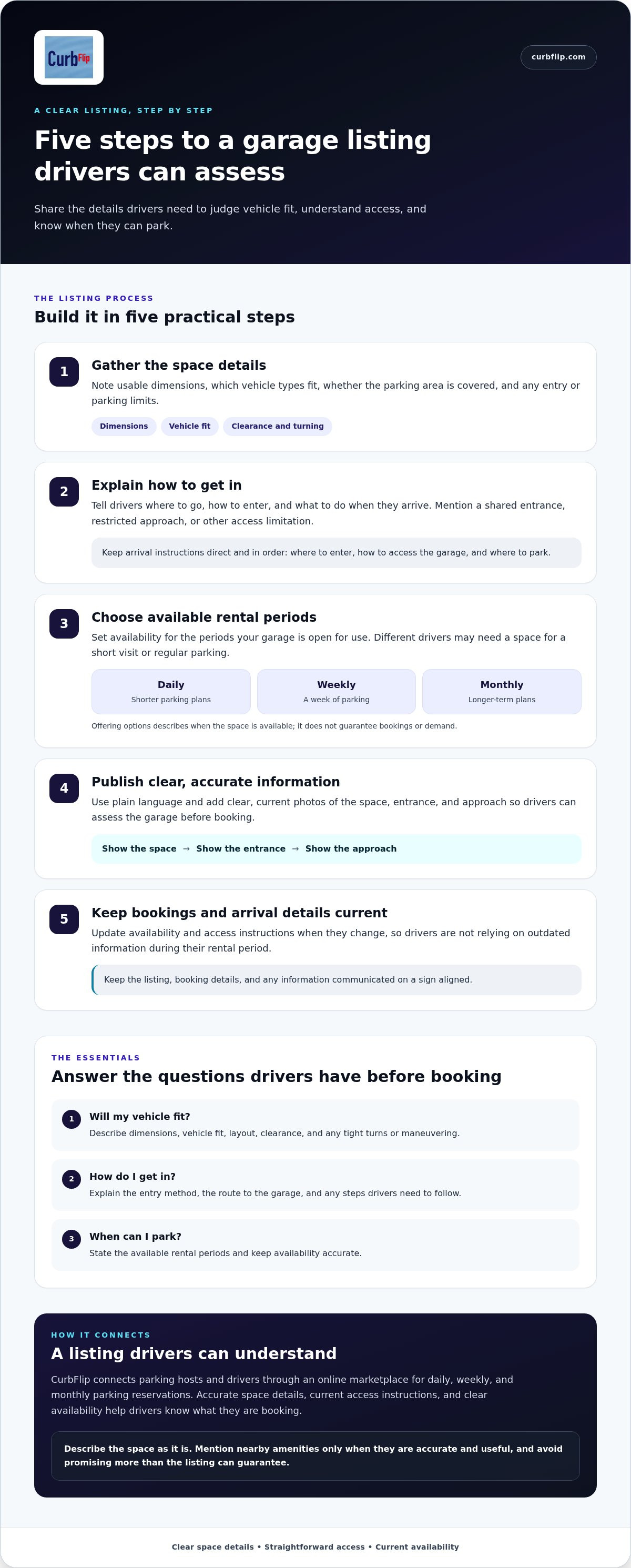
- 1. Gather the details. Note the space dimensions, vehicle fit, whether access is covered, and any limits on entry or parking.
- 2. Explain access. Describe how drivers enter, where they should go, and any steps to follow on arrival.
- 3. Choose rental periods. Set daily, weekly, or monthly availability based on when the garage is open for use. These flexible rental options suit different plans, from a short visit to regular parking, without guaranteeing bookings.
- 4. Publish the listing. Use plain language and accurate photos so drivers can assess the space before booking.
- 5. Manage bookings. Keep availability and arrival instructions current throughout each rental period.
How can hosts make a garage listing easy to understand?
Be specific and consistent. If access instructions change, update the listing and booking details so drivers aren’t relying on outdated information. A short, ordered arrival guide can help: explain where to enter, how to access the garage, and where to park.
Keep the description focused on what drivers need to decide and arrive smoothly. For broader host-planning ideas, read CurbFlip’s Rent Your Parking Space: 2026 Passive Income Guide. For tax questions, refer to the IRS guidance on taxable rental income.
A sign can help direct drivers to the platform. Explore the CurbFlip® “Scan To Pay” Parking Sign.
Make Garage Space Bookable Through CurbFlip
A clear listing gives drivers the details they need. CurbFlip connects parking hosts and drivers through an online marketplace, where hosts can offer daily, weekly, or monthly parking reservations. List your garage with flexible rental options, then keep availability and access details accurate so drivers know what they’re booking.
Each rental period can suit a different parking plan. A driver may need a space for a day, a week, or longer. Offering options lets you describe when your garage is available without assuming which period will attract bookings or promising a particular result.
When can scannable parking signs support a garage listing?
A sign can give interested drivers a way to find CurbFlip and view your listing. For example, someone who sees a sign near your garage can scan it to reach the platform and its booking details. The CurbFlip® “Scan To Pay” Parking Sign With Stand is one option for connecting drivers with the platform. Keep the listing’s availability and access instructions aligned with what you communicate on the sign.
For more on how scannable signs fit into a host’s approach, read CurbFlip Scannable Parking Signs: The Ultimate Guide to Passive Parking Income in 2026. Then explore CurbFlip parking signs to see the sign options.
Put Your Garage Listing in Front of Drivers
A garage space for rent is easier for drivers to assess when your listing spells out the space, vehicle fit, availability, and arrival steps. Use accurate details and photos, then keep booking and access information aligned so drivers know what to expect.
CurbFlip connects parking hosts and drivers through an online marketplace, with daily, weekly, and monthly parking reservations. These flexible rental options let you present periods that work for your space without assuming which will be in demand. A scannable sign can also direct interested drivers to the platform and your listing.
Ready to list your garage and help drivers find it? Explore CurbFlip scannable parking signs to connect drivers with your listing. Clear information and a straightforward path to booking make your space easier to consider and manage.
Frequently Asked Questions
Can I rent out my garage as parking space?
Yes, you can list a garage for parking if you have the authority to offer the space and follow any requirements that apply to your property. Before publishing, consider any relevant lease, building, or community rules. On CurbFlip, hosts can present a garage listing to drivers in locations such as New York, Chicago, Los Angeles, Seattle, Atlanta, San Francisco, London, Denver, Miami, Dallas, Houston, Austin, Nashville, Memphis, New Orleans, Southern California, Toronto, Montreal, and Vancouver.
What should I include in a garage parking listing?
Include the details drivers need to assess the space and plan their arrival. Describe dimensions, vehicle fit, whether the parking is covered, the entrance, and any access limits. Add clear, accurate photos and explain how drivers enter. A useful garage space for rent listing sets realistic expectations, so keep its description and availability up to date.
Can I offer daily, weekly, or monthly garage parking?
Yes. CurbFlip supports daily, weekly, and monthly parking reservations, so you can choose flexible rental options that match when your garage is available. Daily parking may suit a brief visit, while weekly or monthly periods can fit longer parking plans. Describe the periods you offer clearly, but don’t assume a particular option will guarantee bookings.
How do drivers find and book garage space through CurbFlip?
CurbFlip connects parking hosts and drivers through an online marketplace. Drivers can browse available listings, review details such as location and access instructions, and reserve a space for the rental period offered. A clear listing helps them decide whether the garage fits their needs before booking. Hosts can keep availability and arrival information current as plans change.
Disclaimer
The content provided in this article is for informational purposes only. All uses of the CurbFlip name, images, logos, and likeness are the exclusive property of CurbFlip.com. This article may contain information researched by a third-party, meaning CurbFlip does not guarantee the accuracy, completeness, or reliability of any third-party information presented herein and assumes no liability for any decisions made or actions taken based on this content.


