

What if a parking sign could do more than state the rules? In a busy New York neighborhood, clear pay to park signs can connect a physical space with an online reservation, so drivers know where to look instead of guessing whether a spot is available. That clarity helps drivers find the right space and gives hosts a practical way to guide them from the curb to a listing.
A sign works best when it tells drivers what to do next and suits the setting, whether it’s a driveway, lot, event, or airport parking space. In this article, you’ll learn what information to include, how scannable signs can link to a reservation, and how CurbFlip® “Scan To Pay” Parking Sign With Stand helps drivers and hosts connect around a parking space.
Key Takeaways
- Use pay to park signs to show drivers how to access paid parking or find a reservation, rather than leaving them to guess.
- Choose signage that suits the setting, from a driveway to airport or event parking, and keep the message easy to read.
- Give drivers one clear next step so they can move from the physical space to an online reservation option.
- CurbFlip scannable signs connect hosts’ listings with daily, weekly, and monthly parking reservations.
What Is a Pay-to-Park Sign and How Does It Help Drivers?
A pay-to-park sign tells drivers how to access paid parking or find a reservation. Its job is to make the next step clear, not just announce that parking is available.
A static sign gives instructions in words, such as identifying a parking area or pointing drivers toward a booking option. A scannable sign adds a digital route: drivers scan it to reach an online marketplace connected to the space. In a busy Chicago area near an event venue, for example, that link can help a driver find a host-listed spot instead of confusing it with other nearby parking.
What information helps a driver understand a pay-to-park sign?
Use plain language, readable text, and one clear next action. Tell drivers whether they have found the right parking area, then direct them to follow a route or scan to view a reservation option. Avoid squeezing several instructions into a small space.
Consider the arrival from a driver’s point of view. Can they recognize the parking area as they approach? If there are multiple entrances or spaces, does the sign make it clear which one the listing refers to? Is the booking step easy to spot? Answering these questions in order helps reduce guesswork and makes the sign easier to use.
For hosts, a scannable sign connects an offline space to an online listing. CurbFlip’s scannable parking signs connect drivers at the location with parking options on its reservation platform. The CurbFlip® “Scan To Pay” Parking Sign With Stand is one way to make that path visible.
Keep the sign’s purpose in view: help drivers recognize the parking opportunity and understand what to do next. A clear instruction sign supports wayfinding; a scannable sign can also direct drivers to an online booking experience.
How to Choose Pay-to-Park Signs for Your Parking Setting
Start with the space and the driver’s reason for being there. A driveway sign should identify the space as parking, while a sign for airport parking or an event should make that use easy to recognize. For example, a host listing event parking in Chicago can choose wording that connects the space to the event for arriving drivers.
With pay to park signs, clarity matters more than decoration. Choose a message drivers can read as they approach, place it where it’s visible without blocking access, and make the next step clear. If drivers need to turn or follow a route, directional wording can guide them to the space before they look for a booking option.
Which parking locations can benefit from scannable signs?
Scannable signs can suit different host-listed spaces. Match the wording to the location so drivers can recognize the intended use:
- Driveways: Identify the space as available parking and direct drivers to the booking path.
- Beach parking: Make the connection to beach access clear for visitors looking for a nearby spot.
- Church event parking: Help guests recognize parking intended for a church gathering.
- Festival parking: Signal that the space is intended for festival attendees.
Keep the message focused. A driver arriving at a beach or event may not know the area, so simple, location-specific wording can reduce guesswork. Follow the sign rules that apply where your space is located, and avoid adding claims or directions that could confuse drivers.
Choose a sign that fits your setting and shows drivers what to do next. Explore CurbFlip scannable parking signs to find an option for your space.
How CurbFlip Scannable Pay-to-Park Signs Connect Hosts and Drivers
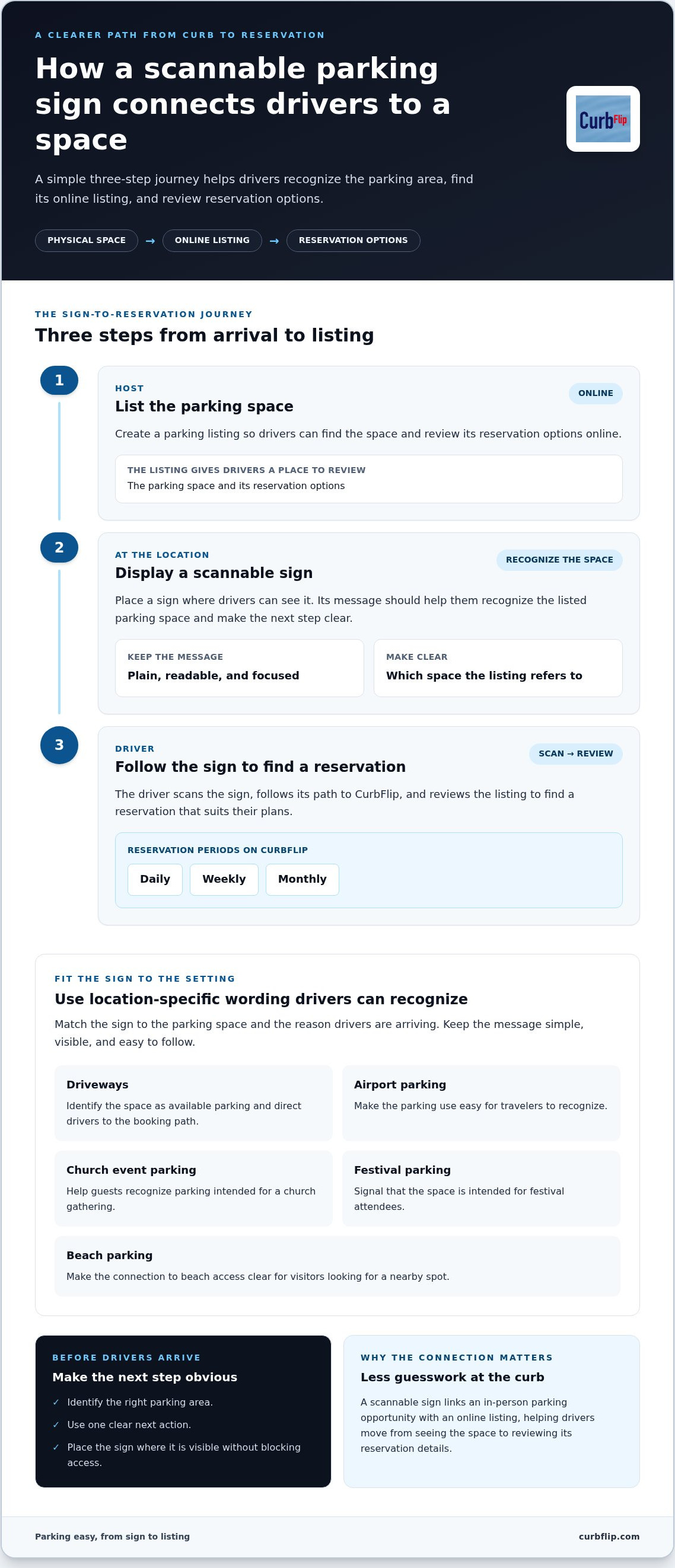
A parking space is easier to find when its online listing and physical location point to each other. With CurbFlip, hosts list spaces on the platform and use scannable pay to park signs to help drivers connect with the listing at the location.
What does the sign-to-reservation journey look like?
The process has three steps:
- List the space. A host creates a parking listing so drivers can find the space and review its reservation options online.
- Display a scannable sign. At the location, the sign helps drivers recognize the listed space.
- Find a reservation. A driver sees the sign, follows its scannable path to CurbFlip, and reviews the listing to find a suitable reservation.
This connection helps hosts make a driveway, airport space, or event spot easier to discover where it’s located. Drivers can move from seeing the space to reviewing its online reservation details, rather than relying on a generic sign that only describes parking rules.
CurbFlip supports daily, weekly, and monthly parking reservations. Drivers can choose the rental period that fits their plans, while hosts can list their spaces on the platform. For example, a traveler arranging airport parking can compare listings based on the length of their trip.
For hosts, a scannable sign connects an in-person parking opportunity with an online listing. Explore CurbFlip pay-to-park signs to find a sign that fits your space and helps drivers take the next step toward a reservation.
Make Your Parking Space Easier to Act On
Before choosing a sign, picture the arrival from a driver’s point of view. Can they tell they’re in the right place? Is the next step easy to spot? This quick check helps you choose wording and placement that suit your space, whether it’s a driveway or a larger parking area.
Think of pay to park signs as part of the experience for both sides. Drivers need a clear path forward. You need a sign that represents your space and helps people find its listing. CurbFlip connects scannable signs with its reservation platform, where drivers can browse daily, weekly, and monthly parking options.
Choose a sign that makes the connection between your location and its online listing easy to understand. Explore CurbFlip pay-to-park signs and make it easier for drivers to find and book your parking space.
Frequently Asked Questions
What is a pay-to-park sign?
A pay-to-park sign identifies paid parking and helps drivers understand how to find a reservation. It can be a useful point of reference when several spaces or entrances are close together. For example, a host can make clear which driveway space is intended for visitors, helping arriving drivers distinguish it from nearby areas.
How do drivers use a scannable pay-to-park sign?
Drivers scan the sign to reach an online parking experience associated with the location. On CurbFlip, they can review reservation options and consider whether a daily, weekly, or monthly rental period suits their plans. A traveler arranging airport parking, for example, can look for an option that fits the length of their trip.
Can I use pay-to-park signs for driveway or event parking?
Yes. Hosts can use them for different parking settings, including driveways and event spaces. CurbFlip supports categories such as airport, beach, church, and event parking. This can help hosts and drivers in New York, Chicago, Los Angeles, Seattle, Atlanta, San Francisco, London, Denver, Miami, Dallas, Houston, Austin, Nashville, Memphis, New Orleans, Southern California, Toronto, Montreal, and Vancouver.
What should a pay-to-park sign say?
Keep the message brief and easy to read. Identify the intended parking use, then give one clear next step, such as directing drivers to the online listing. For a scannable sign, explain what drivers can find through it without promising a particular payment or confirmation process. Follow the local sign rules that apply to your location before displaying it.
Disclaimer
The content provided in this article is for informational purposes only. All uses of the CurbFlip name, images, logos, and likeness are the exclusive property of CurbFlip.com. This article may contain information researched by a third-party, meaning CurbFlip does not guarantee the accuracy, completeness, or reliability of any third-party information presented herein and assumes no liability for any decisions made or actions taken based on this content.


