

What if the only thing standing between your empty pavement and a daily stream of passive income was a ten-minute installation? Many property owners leave money on the table because they're nervous about the technical side of a QR code parking sign setup. You might worry about incorrect placement leading to missed scans or feel confused about how to link a physical sign to your digital account. It's normal to want your setup to look professional and stay durable against the elements without needing constant supervision.
We agree that your parking solution should be stress-free and effective. Follow this definitive 2026 checklist to transform your empty driveway or lot into a revenue-generating asset using CurbFlip scannable signs. You'll learn how to position your signage for perfect scans, sync your payments instantly, and build a professional presence that drivers trust. We're breaking down the process into simple, actionable steps so you can start earning passive income without the headache of manual enforcement.
Key Takeaways
- Identify high-visibility entry points and learn the ideal mounting height to ensure every driver can scan your sign with ease.
- Master the QR code parking sign setup by linking your physical CurbFlip hardware to your digital dashboard in just a few clicks.
- Use simple positioning tricks, like angling your sign to reduce sun glare, and learn how to perform a "driver-seat test" before going live.
- Maximize your earnings by monitoring occupancy trends and adjusting your pricing for peak-hour demand or local events.
Pre-Setup: Preparing Your Space for Scannable Signage
Before you drill your first hole or peel any adhesive, you need a solid plan. A successful QR code parking sign setup starts with choosing the right location. You want to find high-visibility entry points where drivers naturally slow down or come to a complete stop. If a driver has to crane their neck or block active traffic to scan your sign, you'll likely lose out on potential revenue. Look for flat surfaces at eye level near the entrance or directly at the head of the parking stall.
Don't forget to check your surroundings. Verify local zoning laws or HOA rules regarding private parking signage. Some neighborhoods have strict height or size restrictions for signs on residential property. You also need to ensure your parking spaces are clearly numbered or demarcated. Use curb paint or heavy-duty outdoor stickers to match your physical spots to your digital listing. If a driver reserves Spot 4 but can't find a label on the pavement, they'll end up frustrated and your system will feel disorganized.
Clean and clear the mounting area before you begin. If your fence is covered in overgrown ivy or your brick wall has loose debris, the sign won't stay secure for long. Remove obstructions that might cast a shadow over the sign during peak sun hours, as shadows can sometimes interfere with how a phone reads the code. A quick scrub with a stiff brush now prevents a maintenance headache later.
Mapping Your Parking Inventory
Treat your property like a retail shelf. Assign a unique identifier to every spot you plan to monetize. Whether it's Spot A or Spot 101, these numbers must match your digital dashboard exactly. You also need to decide between entry-point signs versus individual-spot signs. Entry signs work best for large, open lots where any spot is fair game. Individual-spot signs are better for premium driveways or specific reserved stalls. Document the exact location of each sign so you can easily reference them when managing your account later.
Tools You Will Need for Installation
Installation is fast, but having the right gear makes it seamless. Gather your basic hardware first. You'll need a power drill with masonry bits if you're mounting to brick or stone. For chain-link fences, heavy-duty zip ties are the most reliable option. Grab some cleaning supplies too. Isopropyl alcohol is perfect for prepping smooth surfaces for adhesive mounts. Use a microfiber cloth to keep the reflective surface of the sign clear. Finally, keep your smartphone charged. You'll need it to interact with the QR code technology during the final digital sync and testing phase.
Hardware Checklist: Mounting Your Sign for Maximum Scannability
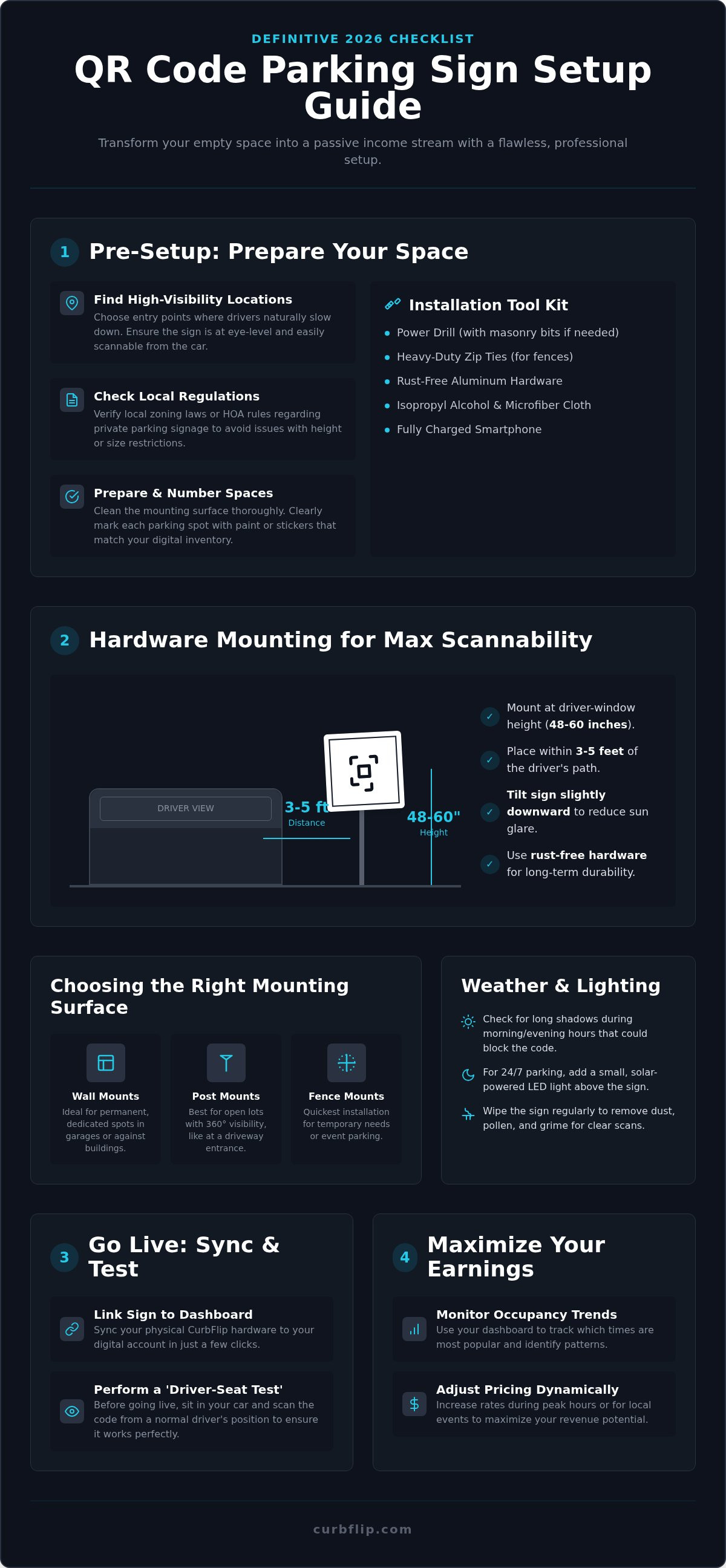
Mount your sign at driver-window height, which is typically between 48 and 60 inches from the ground. This positioning allows drivers to scan the code comfortably without unbuckling their seatbelts or exiting their vehicles. Your QR code parking sign setup is only as good as its scan rate, so ergonomics matter. Angle the sign slightly downward to reduce overhead sun glare. This simple tilt prevents bright light from washing out the QR code's high-contrast squares, ensuring a fast read even during the brightest part of the day.
Keep the sign within 3 to 5 feet of the driver's path. If the sign is placed too far away, standard smartphone cameras will struggle to focus on the code. Use rust-free aluminum hardware for all attachments. Standard steel screws can rust over time, creating orange streaks that might eventually cover the scannable surface and render the spot unusable. Following this hardware checklist ensures your QR code parking sign setup remains a reliable revenue stream for years without requiring constant repairs. For those who want to ensure their signage is built to the highest standards, Banner 4 Sale highlights how in-house large format manufacturing provides the durability needed for long-term outdoor use.
Optimizing for Lighting and Weather
Visibility changes throughout the day. Check your sign's scannability during "Golden Hour" to ensure long shadows don't bisect the code. If you offer overnight parking, consider adding a small solar-powered LED light above the sign to keep it functional 24/7. Regular maintenance is also vital. Wipe down the surface every few weeks to remove dust, pollen, or salt spray. Clear, well-maintained signage signals to drivers that the spot is professionally managed, which is a key part of avoiding QR code scams that often thrive on tampered-with or neglected equipment.
Choosing the Right Mounting Surface
The best surface depends on your specific lot layout. Wall mounts are perfect for permanent, dedicated spots in garages or against buildings. If you're managing an open lot or a driveway entrance where visibility is 360 degrees, post mounts are the superior choice. For temporary needs or event parking, fence mounts with high-tensile zip ties provide the quickest installation. If you're looking for professional hardware that works in any environment, CurbFlip Scannable Parking Signs are designed for easy mounting on all three surface types.
Digital Setup: Linking Your QR Code to the CurbFlip Marketplace
Once your physical sign is securely mounted, it's time to activate the digital half of your QR code parking sign setup. Log into your CurbFlip dashboard and head straight to the 'Manage My Signs' section. This is where the magic happens. Grab your smartphone and scan the unique QR code on your physical sign. This instant handshake registers the specific hardware to your account, ensuring that every scan by a driver directs funds straight to you. It's a fast, one-time process that bridges the gap between your pavement and your bank account.
Next, set your dynamic pricing. You have the flexibility to offer daily, weekly, or monthly reservations depending on your local demand. If you're located near a major transit hub or a popular shoreline, your rates might fluctuate based on the season. To build immediate trust with drivers, upload high-quality photos of the actual parking spot. Seeing the exact space they've booked reduces anxiety and prevents drivers from accidentally parking in a neighbor's driveway. Clear photos are your best tool for creating a professional, reliable listing.
Defining Your Parking Rules
Set clear check-in and check-out times to keep your operation running like clockwork. This prevents overlap between bookings and ensures the spot is empty when the next guest arrives. You should also specify vehicle size limits. If your space is tight, mark it as 'Compact only' or 'No oversized trucks' to avoid property damage. For specialized locations, include specific instructions for 'Beach Parking' or 'Airport Parking' to help drivers navigate local shuttle routes or terminal entrances.
Activating Your Payment Gateway
Connecting your payout method is the final step in the digital chain. Link your preferred gateway, such as Stripe, PayPal, or a direct Bank Transfer, to receive your earnings. Always verify that the QR code redirects correctly to your specific CurbFlip listing page. This verification step is crucial for minimizing security risks in QR code payments. By ensuring your digital link is secure and direct, you protect both your revenue and your customers' data. Finally, enable instant notifications. You'll get an alert the moment a spot is booked, giving you total peace of mind that your property is working for you while you go about your day.
The 'First Scan' Audit: Testing Your Setup Before Going Live
Don't assume your system works just because the sign is bolted down. Perform a "Driver-Seat Test" to verify the user experience from the actual driver's perspective. Pull your car into the spot and try to scan the code without unbuckling your seatbelt or opening your door. If you have to lean awkwardly out the window or struggle with the camera's focus, your QR code parking sign setup needs a slight adjustment. Test the code with both iOS and Android devices. Different camera sensors and software versions can react differently to lighting and contrast, so cross-platform compatibility is essential for a high-converting spot.
Speed is the next priority. Verify that your landing page loads in under 3 seconds on a standard 4G or 5G connection. Drivers are often in a hurry. A slow-loading payment portal leads to abandoned bookings or, worse, people parking without paying because they think the system is broken. Finally, execute a $1 test transaction. This confirms your payout flow is active and that the funds are correctly routed to your connected bank account or digital wallet. It's the ultimate peace of mind before you open your space to the public and start generating revenue.
Troubleshooting Common Scan Failures
If your camera "hunts" for focus without catching the link, check for "QR Bloat." This happens when a URL is too long or complex, making the code density too high for easy scanning from a distance. Keep your digital links clean and direct. If glare is the issue, adjust the sign angle by 5 to 10 degrees. A small tilt can move a bright reflection away from the camera lens and instantly fix scanning issues. Also, perform a distance check. Your QR code must be large enough to be read clearly from at least 6 feet away to accommodate different vehicle heights and parking angles.
The Passenger-Side Perspective
Strategic placement prevents frustrated customers. Ensure your signs are mounted on the driver's side of the parking stall whenever possible. Scanning across a wide passenger seat is difficult for most drivers and often results in failed attempts or blocked views. If your lot follows a one-way path, ensure the signs face the direction of traffic flow so they're visible as the driver approaches. Double-check that no landscaping, low-hanging branches, or neighboring cars block the line of sight to the sign. If you want to ensure your hardware meets these professional standards, order your CurbFlip Scannable Parking Signs to get started with tested, high-visibility equipment.
Scaling and Management with CurbFlip Scannable Parking Signs
Your dashboard is your command center. It tracks every scan and transaction in real time, giving you a clear picture of how your assets are performing. Once your initial QR code parking sign setup is complete, use this data to monitor occupancy trends. If you notice your driveway is consistently full on Saturday afternoons, you've found a high-demand window. You can take control of your revenue by adjusting your pricing for "Event Parking" during local stadium games, concerts, or seasonal festivals. This flexibility ensures you're never leaving money on the table when demand in your neighborhood spikes.
Securing long-term, predictable income is just as simple. Use the "Monthly Reservation" feature to attract local commuters or residents who need a reliable, permanent spot. This creates a steady stream of passive income without the need for daily management. As your business grows and you decide to monetize more pavement, you can easily order additional CurbFlip Scannable Parking Signs. Expanding your inventory is a seamless process that keeps your property looking professional and trustworthy to every driver who pulls in.
Managing Multiple Spots
Efficiency is key when you're handling more than one space. Use unique QR codes for every individual spot to track which areas of your lot are most popular. You can group your inventory into categories like "Premium" for spots closer to the entrance or "Economy" for those further back. This helps your listing stand out in the marketplace and gives drivers options that fit their budget. To help your customers understand the booking process, you can share our daily parking reservation guide. It's a great way to educate drivers and ensure their experience is completely stress-free.
Maintaining Your Hardware
High-quality signs are built to last, but they still need occasional attention. Schedule a quarterly "Sign Health" check to look for signs of fading, weathering, or vandalism. It's smart to keep a backup sign in storage. If a sign is ever damaged by a vehicle or the elements, you can replace it immediately and avoid any downtime in your earnings. Don't forget to update your digital listing photos seasonally. A fresh photo showing a clear, well-maintained spot during the current season helps build confidence and reinforces the reliability of your QR code parking sign setup. Keeping your physical and digital presence in sync is the best way to ensure long-term success.
Ready to Turn Your Pavement Into Profit?
Transforming your unused space into a reliable income stream is no longer a complex project. By following this checklist, you've mastered the essentials of a professional QR code parking sign setup. You now know how to position your hardware for maximum scannability and how to sync your physical spots with a digital marketplace. These small adjustments, like checking for glare and performing a driver-seat test, are what separate a frustrating experience from a seamless, automated payout.
CurbFlip has been a trusted partner for property owners since 2013. You don't need any technical experience to get started, and we handle the secure payment processing so you can focus on scaling your inventory. Whether you're monetizing a single driveway or a large event lot, the tools are ready to help you succeed. Your empty pavement is a valuable asset, and now you have the roadmap to unlock its full potential.
Start Monetizing Your Property with CurbFlip Scannable Signs Today
Take that first step today. Your property is ready to start working for you, and we're here to make the process simple and rewarding.
Frequently Asked Questions
Do I need a special app to set up the QR code parking sign?
No, you don't need a special app to manage your signage. You can handle the entire process through a standard web browser on your smartphone. Simply log into your CurbFlip dashboard to scan and link the sign to your listing. This app-free approach ensures that both you and your drivers can complete transactions quickly without the friction of downloading new software.
What happens if a driver scans the sign but doesn't pay?
The reservation is only valid and confirmed once the payment is successfully processed through the platform. If a driver scans the code but fails to complete the transaction, the spot remains listed as available in the marketplace. You can monitor scan activity in your dashboard, but the digital "reserved" status is only triggered by a verified payment, ensuring your revenue is protected.
Can I use one QR code for multiple parking spots?
No, you should use a unique QR code for every individual parking spot to maintain accurate tracking and inventory management. Assigning a specific code to each space is a vital part of a professional QR code parking sign setup. It prevents double-booking errors and helps drivers find their exact reserved location, which is especially important for premium spots or assigned driveways.
How do I change the price associated with my QR code sign?
You can update your pricing instantly through your online dashboard without ever touching the physical sign. Since the QR code is a dynamic link, it simply points drivers to your digital listing page. Log in, navigate to your spot settings, and adjust your daily or event rates as needed. The new pricing goes live the moment you save your changes in the system.
Will the QR code still work if the sign gets scratched or dirty?
Yes, the QR codes on our signs include built-in error correction that allows them to function even with minor surface scratches or dust. However, heavy mud or deep gouges can eventually interfere with a smartphone camera's ability to read the pattern. We recommend a quick wipe-down with a damp cloth every few months to keep the surface clear and maintain a professional appearance.
Can I set up QR parking for a temporary event like a church fundraiser?
Yes, you can easily activate or deactivate your listings to accommodate temporary events or fundraisers. Simply set your availability in the dashboard to match the specific dates and times of your event. This flexibility makes it an ideal solution for church parking or community festivals where you only want to monetize your empty pavement for a short, specific window of time.
Do I need to provide Wi-Fi for drivers to scan the QR code?
No, drivers use their own cellular data to scan the code and access the payment portal. The system is designed to be completely self-contained and doesn't require any additional infrastructure from you. As long as your property has standard 4G or 5G cell reception, drivers can complete their bookings and payments in seconds without needing a local Wi-Fi connection.
How do I get paid once a driver scans and books through CurbFlip?
Funds are automatically routed to your connected payout method, such as Stripe or PayPal, after the reservation is finalized. CurbFlip handles all the heavy lifting of the payment processing for you. Once your initial QR code parking sign setup is linked to your account, you can track your total earnings in real time through your dashboard and enjoy a hands-off approach to generating income.
Disclaimer
The content provided in this article is for informational purposes only. All uses of the CurbFlip name, images, logos, and likeness are the exclusive property of CurbFlip.com. This article may contain information researched by a third-party, meaning CurbFlip does not guarantee the accuracy, completeness, or reliability of any third-party information presented herein and assumes no liability for any decisions made or actions taken based on this content.


