

What if the hardest part of parking isn’t finding a space, but knowing what to do when you arrive? A contactless parking check-in can make the journey simpler when drivers can confirm their booking, locate the right spot, and understand how to enter.
Booking online and getting through a gate aren’t always the same thing. Drivers need clear directions, while hosts need an easy way to share them. A useful setup connects each step without leaving anyone guessing.
This guide compares contactless parking options for drivers and hosts. You’ll learn what a clear arrival experience involves, what to check in booking instructions, and how scannable signs can work with online reservations. CurbFlip connects its parking signs to its reservation platform, giving hosts another way to direct drivers to a digital booking flow. Use the checklist below to assess whether a setup fits your property.
Key Takeaways
- Understand how contactless parking check-in can guide drivers from finding a space to following arrival instructions, without assuming it controls a gate.
- Compare booking details, sign readability, and the clarity of parking directions.
- Match daily, weekly, or monthly reservations to the rental periods you and your drivers need.
- Use accurate space details and visible signage to make arrival easier for drivers.
What Contactless Parking Check-In Means for Drivers and Hosts
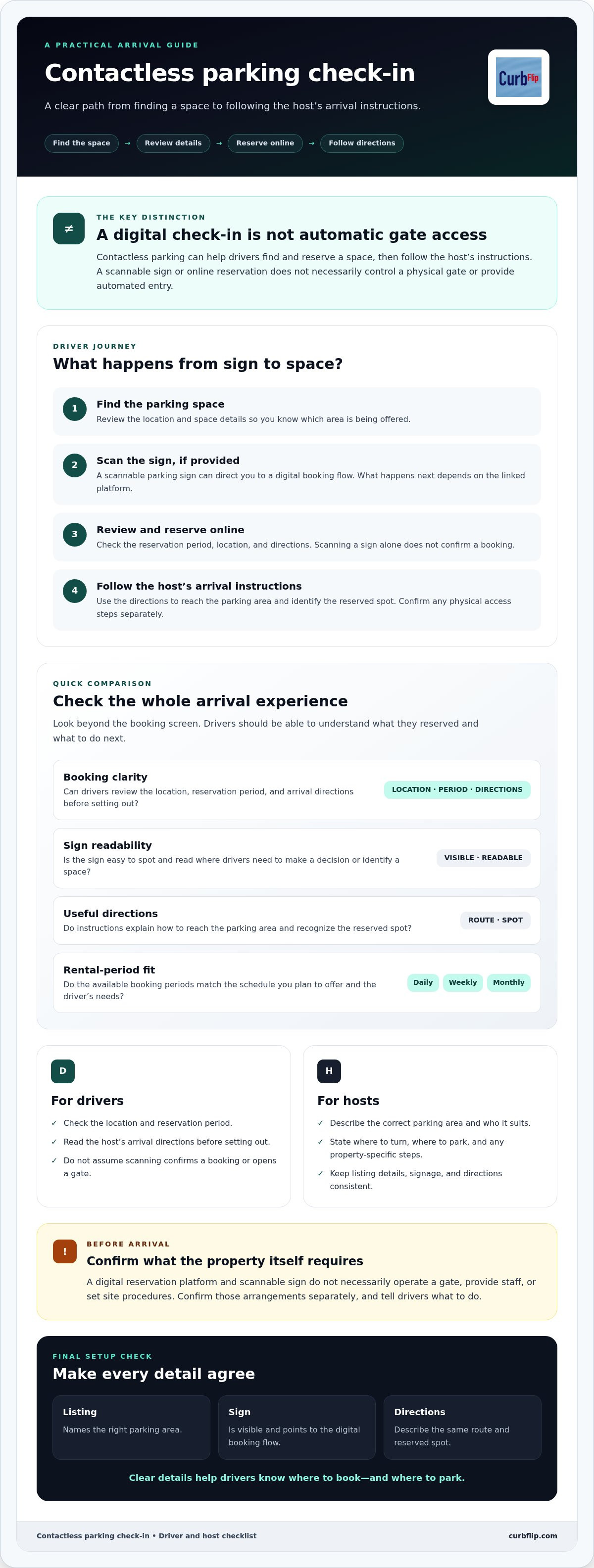
Contactless parking check-in is a digital process for finding and reserving a space, then following the host’s instructions to identify where to park. It can reduce uncertainty, but it doesn’t automatically control a physical gate or provide automated entry. That’s different from an automatic parking system, which refers to technology that helps a vehicle park itself.
The basic journey is straightforward: find a space, review its details and directions, reserve online, then follow the host’s arrival instructions. Before setting out, drivers should check the reservation period, location, and any directions for finding the space. Hosts should make sure listing details and arrival instructions match the property.
For a quick look at one parking technology, watch this video:
What happens when a driver scans a parking sign?
A scannable sign can direct a driver to a digital booking flow. The next steps depend on the linked platform, so drivers should check the page and reservation details rather than assume that scanning confirms a booking or opens a gate. CurbFlip’s signs connect to its reservation platform, where drivers can search for parking and book online.
Clear directions are especially useful at an airport or event, where drivers may need to distinguish a private space from nearby parking. Hosts can help by identifying the space and stating exactly where to turn or park. Signs and online reservations support the process, but instructions for physical access remain essential.
How to Compare Automated Parking Check-In Systems
Compare the full arrival experience, not just the booking screen. A contactless parking check-in setup should make it clear what the driver reserved and what to do next. Use this checklist:
- Check booking clarity. Can drivers review the space location, reservation period, and host’s arrival directions before they set out?
- Assess sign readability. Is the sign easy to spot and read at the point where drivers need to make a decision or identify a space?
- Review instructions. Do directions explain how to reach the parking area and recognize the reserved spot?
- Match rental periods. Do the daily, weekly, and monthly booking options match the periods you plan to offer?
Also check what the property itself requires. A digital reservation platform and scannable sign don’t necessarily operate a gate, provide staff, or set site procedures. Confirm separately whether your location needs those arrangements, and tell drivers what to do.
Which check-in features matter for your parking location?
For airport or event parking, prioritize directional guidance and a clear way to identify the reserved space. Drivers arriving among several entrances or parking areas need directions that distinguish your space from nearby options. For recurring parking, check whether daily, weekly, or monthly bookings suit your intended schedule and your drivers’ needs.
The same checks apply whether you’re hosting or looking for parking in New York, Chicago, Los Angeles, Seattle, Atlanta, San Francisco, London, Denver, Miami, Dallas, Houston, Austin, Nashville, Memphis, New Orleans, Southern California, Toronto, Montreal, or Vancouver. Make directions specific to the property, rather than relying on a city name alone to help drivers find the space.
Hosts who want to direct drivers to a digital booking flow can consider CurbFlip scannable parking signs. Choose signage that suits the location, then check that the reservation details and on-site directions agree. This helps drivers understand where to book and where to park.
Set Up a Clear Contactless Parking Check-In Experience
A smooth contactless parking check-in starts with details drivers can trust. Before listing a space, make sure its description matches the property and intended use. Explain how to identify the spot and reach it, using concise directions that reflect the actual arrival route.
What should hosts prepare before listing a space?
Use this quick setup check:
- Confirm the space details. Describe the correct parking area and who it suits, such as a daily visitor or a driver seeking airport parking.
- Write clear arrival directions. State where to turn, where to park, and any property-specific steps the driver needs to follow.
- Make signage easy to notice. Choose relevant scannable signage and place it where drivers can see and understand it. Check that its directions match the listing.
Before publishing, compare the listing, sign, and directions side by side. Check that they name the same parking area, describe the same route, and don’t leave drivers to guess which space is reserved. CurbFlip connects hosts and drivers through an online marketplace for daily, weekly, and monthly reservations, and its scannable signs connect to the reservation platform. Reservations and signage support a digital booking flow; they don’t provide on-site access control or parking management.
Drivers should review reservation details before setting out. On arrival, follow the host’s directions and use the space description to confirm you’ve found the right spot. If a gate or other access step applies, rely on the host’s instructions rather than assuming that booking or scanning a sign will open it.
Hosts who want to direct drivers to a digital booking flow can explore CurbFlip scannable parking signs. Match the sign to the location, then keep the listing and arrival instructions consistent with it.
Choose a Setup Drivers Can Follow
A smooth parking experience depends on more than a digital booking. Drivers need to understand what they reserved and how to find it. Hosts need accurate space details, visible signage, and directions that match the property. Keep those pieces aligned so the contactless parking check-in is clear from reservation to arrival.
Choose a booking setup that fits how you plan to rent your space. CurbFlip’s marketplace supports daily, weekly, and monthly parking reservations, while its scannable parking signs connect with the reservation platform. Together, they can help hosts guide drivers toward a digital booking flow without implying that a scan controls physical access.
To direct drivers to a digital booking flow, explore CurbFlip scannable parking signs and find an option that fits your property.
Frequently Asked Questions
What is contactless parking check-in?
Contactless parking check-in is a digital process for finding a space, reviewing its details, reserving online, and following instructions to park. It can make booking and arrival clearer for drivers and hosts, but it doesn’t necessarily control entry to the property. A reservation platform or scannable sign is separate from physical gate access, which depends on the site’s own arrangements.
How does QR-code parking check-in work?
A QR code on a parking sign can direct a driver to digital information or a booking flow. The driver reviews what’s available and follows the instructions shown. CurbFlip’s scannable signs connect with its reservation platform, where drivers can search for parking and book online. The steps after scanning depend on the flow presented, so check the page and reservation details rather than assuming a scan completes every step.
Can contactless parking check-in work without a gate?
Yes. Digital reservations and physical access arrangements are separate, so a driver can reserve a space online and follow the host’s directions even if there’s no gate. The host should explain how to find and identify the reserved spot. If the property has a gate or another entry procedure, share those instructions separately. A booking or sign scan alone doesn’t open a gate.
What should I look for in an automated parking check-in system?
Look for clear booking details, readable signage, and arrival instructions that help drivers locate the correct space. Check that booking periods fit your plans, and confirm any site-specific access needs. Whether your property is in New York, Chicago, Los Angeles, Seattle, Atlanta, San Francisco, London, Denver, Miami, Dallas, Houston, Austin, Nashville, Memphis, New Orleans, Southern California, Toronto, Montreal, or Vancouver, make directions specific to the location and easy for drivers to follow.
Disclaimer
The content provided in this article is for informational purposes only. All uses of the CurbFlip name, images, logos, and likeness are the exclusive property of CurbFlip.com. This article may contain information researched by a third-party, meaning CurbFlip does not guarantee the accuracy, completeness, or reliability of any third-party information presented herein and assumes no liability for any decisions made or actions taken based on this content.


