

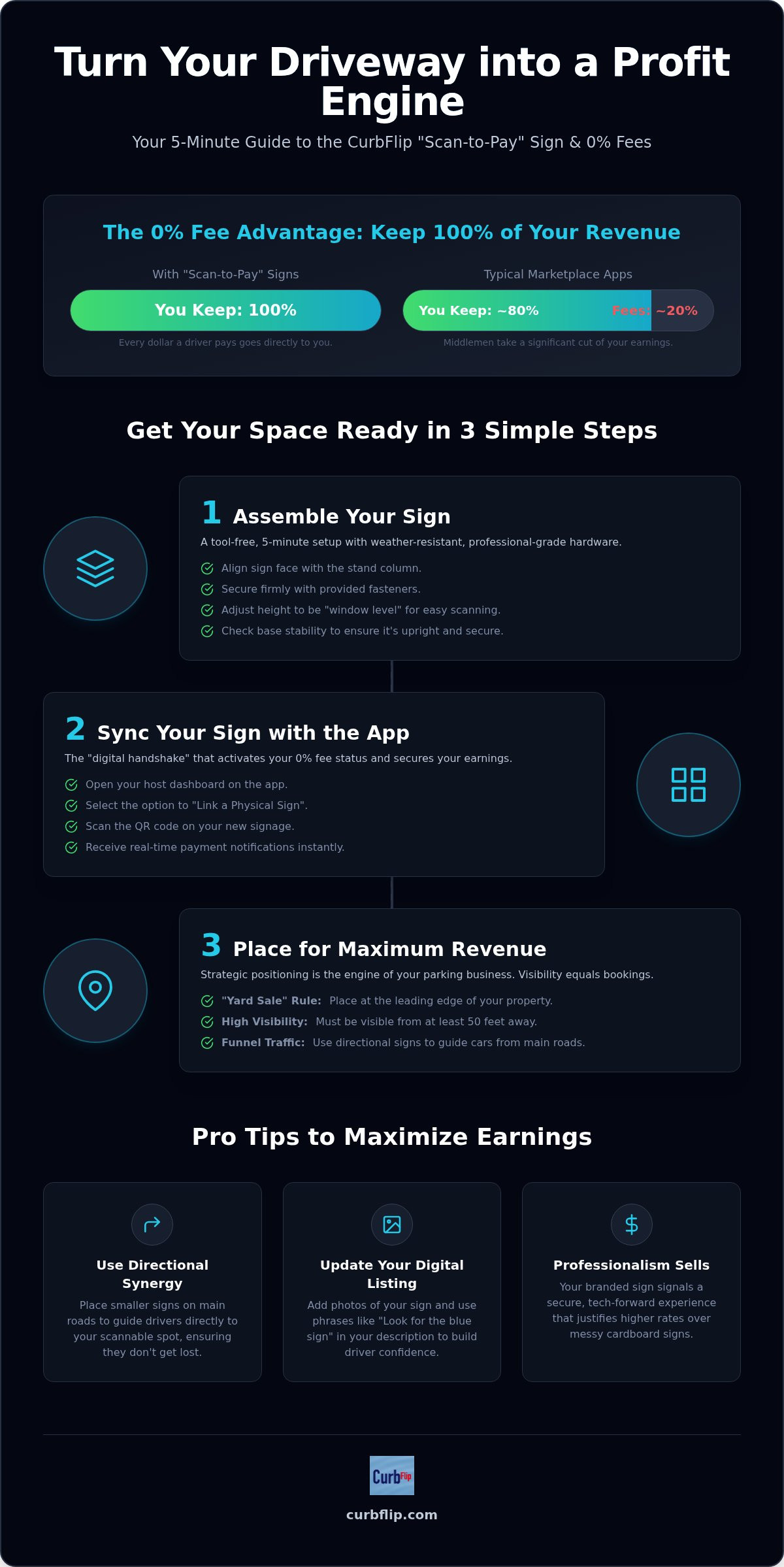
What if you could turn your empty driveway into a revenue stream without losing a cent to platform fees? You likely agree that it's frustrating to watch a middleman take a cut of your money just for hosting a spot. This CurbFlip parking sign setup guide is designed to end that frustration. By using physical "Scan to Pay" signs, you activate a 0% fee structure. This means you keep 100% of your revenue while providing a seamless, contactless experience for every driver who pulls in.
We'll show you exactly how to transform your property into a professional parking operation in five minutes. This guide covers assembling your sign and syncing your QR code with payment apps like Venmo or Cash App. You'll also learn to position your signage for maximum visibility and trust. It's time to stop worrying about tech and start watching real-time payments hit your phone. Let's get your space ready for its first customer.
Key Takeaways
- Assemble your weather-resistant CurbFlip scannable signage in under five minutes using heavy-duty stands built for daily outdoor use.
- Activate your 0% transaction fee status automatically when you transition drivers from the app to your physical "Scan to Pay" signs.
- Use this CurbFlip parking sign setup guide to link your sign's QR code to your payment dashboard for secure, real-time earnings.
- Increase your booking rates by positioning directional signs to funnel traffic from busy main roads directly into your private spots.
Unboxing and Assembling Your CurbFlip Scannable Signage
Your package has arrived, and it's time to turn that empty pavement into a revenue stream. Whether you're unboxing the flagship CurbFlip® “Scan To Pay” Parking Sign With Stand or a specialized version for beach or stadium parking, the assembly logic is identical. We designed these components for a 5-minute setup that requires zero technical skills. You'll find a weather-resistant sign face and a heavy-duty stand inside. This CurbFlip parking sign setup guide ensures you don't waste time on complicated construction or professional contractors.
The hardware is completely tool-free and ready for immediate deployment. The high-visibility colors and durable materials are built to withstand intense sun, heavy rain, and the chaos of high-traffic event days. The heavy-duty stand isn't just about strength; it's about confidence. When a driver sees a professional, upright sign, they feel secure about the transaction. Before you deploy, it's wise to have an understanding right-of-way laws to ensure your sign is placed safely on your private property line while remaining visible to the public.
Step-by-Step Hardware Assembly
Follow these quick steps to get your signage standing tall and ready for business. This CurbFlip parking sign setup guide focuses on stability and visibility to ensure you never miss a potential booking.
- Align the sign face holes with the mounting points on the central stand column.
- Secure the face using the provided fasteners. Tighten them firmly to keep the sign stable and prevent rattling during windy conditions.
- Adjust the telescoping stand height. Aim for "window level" so drivers can scan your QR code easily without even leaving their driver's seat.
- Check the base stability. Ensure the stand is upright and positioned where it won't be obstructed by parked vehicles or landscaping.
Pro tip: If your parking area is tucked away or difficult to find from the main road, visit the CurbFlip Store to pick up directional signs. These help guide drivers from busy streets straight to your scannable flagship sign, ensuring a stress-free experience for your customers.
The Digital Handshake: Syncing Your Sign with the CurbFlip App
Once your hardware is standing, it's time to activate your profit engine. This CurbFlip parking sign setup guide focuses on the most critical benefit: bypassing standard marketplace fees. By purchasing a physical sign, you unlock 0% transaction fees. This means every dollar a driver pays goes directly into your pocket. To start, open your host dashboard and select the option to link a physical sign. Scan the QR code on your new signage to verify the connection. This "digital handshake" ensures our system recognizes your 0% fee eligibility immediately.
Security is the backbone of this process. Our platform adheres to secure QR code payment standards, giving your customers peace of mind. Once synced, you have total control. Use the app to toggle your "Scan to Pay" spot on or off instantly. If you have a private event or need the space, one tap stops new bookings. You'll receive real-time notifications the moment a driver scans and pays. You don't need to be on-site to know your asphalt is earning.
Optimizing Your Digital Listing for Sign Users
Consistency builds trust. Update your listing description to mention your physical signage. Use phrases like "Look for the Blue CurbFlip Sign" to guide drivers. High-quality photos showing the sign's exact location on your property are essential. Drivers feel more confident when the digital image matches the physical reality. Check out the CurbFlip Comparison Scorecard to see how this setup beats industry standards. If you need more visibility, browse the latest signage options to expand your parking empire.
Strategic Deployment: Where to Place Your Sign for Maximum Revenue
Visibility is the engine of your parking business. If drivers don't see your sign until they've already passed your driveway, you've lost the sale. Follow the "Yard Sale" rule: place your primary scannable sign at the leading edge of your property. It should be visible to approaching traffic from at least 50 feet away to give drivers time to safely slow down. This CurbFlip parking sign setup guide recommends using directional synergy to funnel traffic. If your spot is on a side street, place "Slight Left" or "Right" directional signs on the main road to lead drivers directly to your scannable flagship sign.
Professionalism builds trust during chaotic stadium or concert events. While neighbors use messy cardboard, your professional CurbFlip branding signals a secure, tech-forward experience. This contrast justifies higher rates and faster fills. Don't forget the night shift. Placing your sign under a street lamp or porch light increases nighttime booking rates. A well-lit sign is easier to scan and provides driver confidence that the space is safe. It's a simple step that ensures your asphalt earns income around the clock.
Location-Specific Placement Tips
Tailor your strategy to your audience. For Beach Access, place signs directly at the front of the space to catch early-morning surfers and families. For Airport Parking, position signs near the entrance to facilitate quick "Scan and Go" behavior for travelers in a rush. This CurbFlip parking sign setup guide also applies to specific niches like church or event lots where entry points are high-traffic zones. Read our Guide to Passive Parking Income for more advanced marketing strategies.
Start Earning From Your Empty Parking Spots Today
Transforming your property into a profit center is faster than you think. By following this CurbFlip parking sign setup guide, you've learned how to assemble professional, weather-resistant hardware and sync it with your host dashboard in just five minutes. This simple physical-to-digital connection is the key to keeping 100% of your revenue and bypassing standard marketplace fees. Whether you're hosting travelers near the airport or sports fans near a stadium, your scannable sign works around the clock to capture every booking.
CurbFlip has been a trusted partner for hosts since 2013, providing the tools you need for a stress-free experience. Don't let your driveway sit empty while drivers search for better deals. Start monetizing your space with a CurbFlip Scannable Sign today and watch the payment notifications hit your phone in real-time. Your journey to passive parking income begins with one professional sign.
Frequently Asked Questions
Do I need to be present when a driver scans the sign to pay?
You don't need to be physically present when a driver scans your sign to pay for a spot. The system handles the entire transaction digitally through the driver's web browser. Whether you're at work in New York or relaxing at home in Denver, you'll receive real-time notifications on your phone the moment a payment is confirmed. This allows for a completely hands-off, stress-free hosting experience.
How does CurbFlip know to charge me 0% fees instead of the standard 5%?
Our platform automatically detects your 0% fee eligibility once you complete the digital handshake described in this CurbFlip parking sign setup guide. When you link your physical sign's unique QR code to your host dashboard, the system bypasses the standard 5% marketplace fee. This ensures that every dollar earned from a physical scan is deposited directly into your account without any platform deductions.
Can I use the same sign for multiple parking spots on my property?
You can use a single flagship sign to manage an entire driveway or multi-car lot in cities like Chicago or Atlanta. However, if you're renting out specific, numbered spaces, placing individual signs helps drivers identify their exact spot. This clear communication prevents confusion and ensures a neighborly experience. For complex layouts, directional signs from our store help funnel drivers from the street to the correct area.
What happens if a driver scans the sign but doesn’t complete the payment?
If a driver scans the QR code but fails to finalize the transaction, you won't receive a payment notification. The system requires a completed digital checkout to authorize the stay. Since CurbFlip doesn't provide on-site enforcement or towing, we recommend checking your phone for the real-time alert before the driver leaves their vehicle. This ensures every car on your property in Los Angeles or Miami is a paying customer.
Disclaimer
The content provided in this article is for informational purposes only. All uses of the CurbFlip name, images, logos, and likeness are the exclusive property of CurbFlip.com. This article may contain information researched by a third-party, meaning CurbFlip does not guarantee the accuracy, completeness, or reliability of any third-party information presented herein and assumes no liability for any decisions made or actions taken based on this content.


